Process-PSModule#
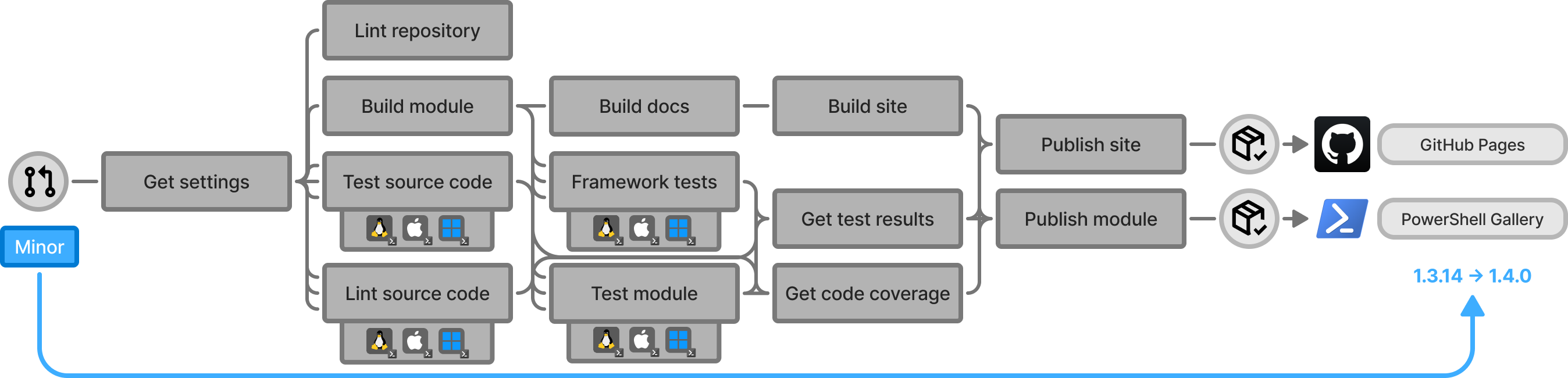
An end-to-end PowerShell module pipeline that automates the entire lifecycle of a module: building from source, running cross-platform tests, enforcing code quality and coverage, generating documentation, and publishing the versioned module to the PowerShell Gallery and its documentation site to GitHub Pages. It is the core workflow used across all PowerShell modules in the PSModule organization, ensuring reliable, automated, and maintainable delivery of PowerShell projects.
How it works#
The caller workflow runs for pull-request lifecycle events and pushes to the repository's default branch. Open pull requests run CI and can publish prereleases; closed pull requests clean up their prereleases. An important default-branch push is the sole authority for a stable release. When that push is the exact merge commit of a pull request, its labels and release notes supply the release metadata. See the scenario matrix for the resulting job execution.
Everything is packaged into a single reusable workflow so that a module repository only needs a small caller workflow and one settings file. A user configures the behaviour by editing .github/PSModule.yml.
Start here#
New to Process-PSModule? Work through these in order.
| Page | Description |
|---|---|
| Get started | Create a module repository from the template and get the pipeline running. |
| Repository setup | Configure GitHub Pages, PSGALLERY_API_KEY, permissions, and the caller workflow. |
| Your first release | The pull request flow, version labels, and the resulting default-branch release. |
Guides#
Task-oriented deep dives into the pipeline's functionality.
| Page | Description |
|---|---|
| Calling the workflow | The caller workflow, passing test secrets and variables with TestData, and important-file change detection. |
| GitHub App authentication | Configure Shelly credentials and the scoped tokens used for repository API operations. |
| Configuring the pipeline | Worked examples for coverage targets, rapid testing, linting, and PR-based release notes. |
| Structuring your module | The repository and module source layout the workflow expects, and how to declare dependencies. |
| Writing module tests | Test discovery, setup and teardown phases, and shared test infrastructure. |
| PSModule process marketplace | Register the initiative marketplace and install the PSModule process plugin. |
| Skipping framework tests | Skip individual framework tests on a per-file basis. |
| Versioning and releases | Label-driven versioning, prereleases, and what a release produces. |
| Validating before review | The PSModule validation pass before a draft pull request is marked ready. |
| Writing plugin skills | Author and maintain thin plugin skills that point to shared documentation. |
| Module development orchestration | Coordinate substantial work across an orchestrator session and narrowly scoped child sessions. |
Reference#
Look up the framework's exact contracts and the module-development standards it supports.
| Page | Description |
|---|---|
| Module development foundations | The full set of module-authoring conventions supported by the framework. |
| Repository Standard | Required repository files, metadata, onboarding, and workflow wiring. |
| PowerShell module standard | Source layout, function design, and module-specific implementation conventions. |
| Module types | Conventions for integration (API) and data modules. |
| Test Specification | Consistent Pester test structure and coverage expectations. |
| Versioning | Semantic version changes based on public API impact. |
| Settings | Every available setting in .github/PSModule.yml and the full defaults. |
| Workflow inputs | Inputs, secrets, and permissions of the reusable workflow. |
| Pipeline stages | The job-by-job breakdown, from Plan through Publish Docs. |
| Scenario matrix | Which jobs run for each trigger scenario. |
| Framework test IDs | The framework tests enforced on source code and on the built module. |
| Dependencies | The actions, modules, and services the workflow composes. |
| PowerShell guidance scripts | Runnable reference scripts for common PowerShell implementation patterns. |
Specification#
The requirements and architecture behind the pipeline. Primarily for those maintaining Process-PSModule itself.
| Page | Description |
|---|---|
| Specification | Spec, design, and the principles that guide both. |
A GitHub & PowerShell development framework#
PSModule infuses GitHub with PowerShell and brings more to the PowerShell ecosystem by using the GitHub platform to its fullest extent. The framework is two things in one: a collection of reusable PowerShell modules, and a set of GitHub Actions workflows that automate the full PowerShell module (software) delivery lifecycle — the DevOps functionality that the ecosystem is missing.
We empower PowerShell-savvy developers to effortlessly transform their ideas into impactful solutions, automating the repetitive tasks so developers — whether consumers or contributors — can concentrate on coding without distractions.
Where we are headed is tracked as objectives and initiatives.
Cross-org guidance#
Cross-org standards and reusable solution documentation are now canonical in MSXOrg/docs: